Repair Pilot Repair Pilot
  • Features
    • Job Management
    • Customer CRM
    • Leads / Enquiries
    • Customer Portal
    • Automation
    • Invoicing & Payments
    • Stock Management
    • Trade In / Buy In
    • Customisation
    • Multiple Stores/Locations
    • Reporting & Insights
  • Integrations
  • Pricing
  • Blog
  • About
  • Contact
Request a demo
Start Free Trial
Repair Pilot Repair Pilot
  • Features
    • Automation
    • Customer CRM
    • Customer Portal
    • Customisation
    • Invoicing & Payments
    • Job Management
    • Leads / Enquiries
    • Multiple Stores/Locations
    • Reporting & Insights
    • Stock Management
    • Trade In / Buy In
  • Integrations
  • Pricing
  • About
  • Blog
  • Contact
  • Create an account
  • Log in
  • Buy Theme

Schedule Your Repair Pilot Demo

Don't have time to trial the software, or just want us to show you what repair Pilot can do? No problem, let one of our experts guide you through our platform.

Click here to schedule your demo
Repair Pilot > Repair Pilot Help Centre > Automation & Workflows > Triggering automations by job status
View Categories
  • Home
  • Repair Pilot Help Centre
  • Automation & Workflows
  • Triggering automations by job status

Triggering automations by job status

< 1 min read

Guide with Localhost #


  • Created by Shaun Brereton on 08/05/2025
  • Edit original on dubble

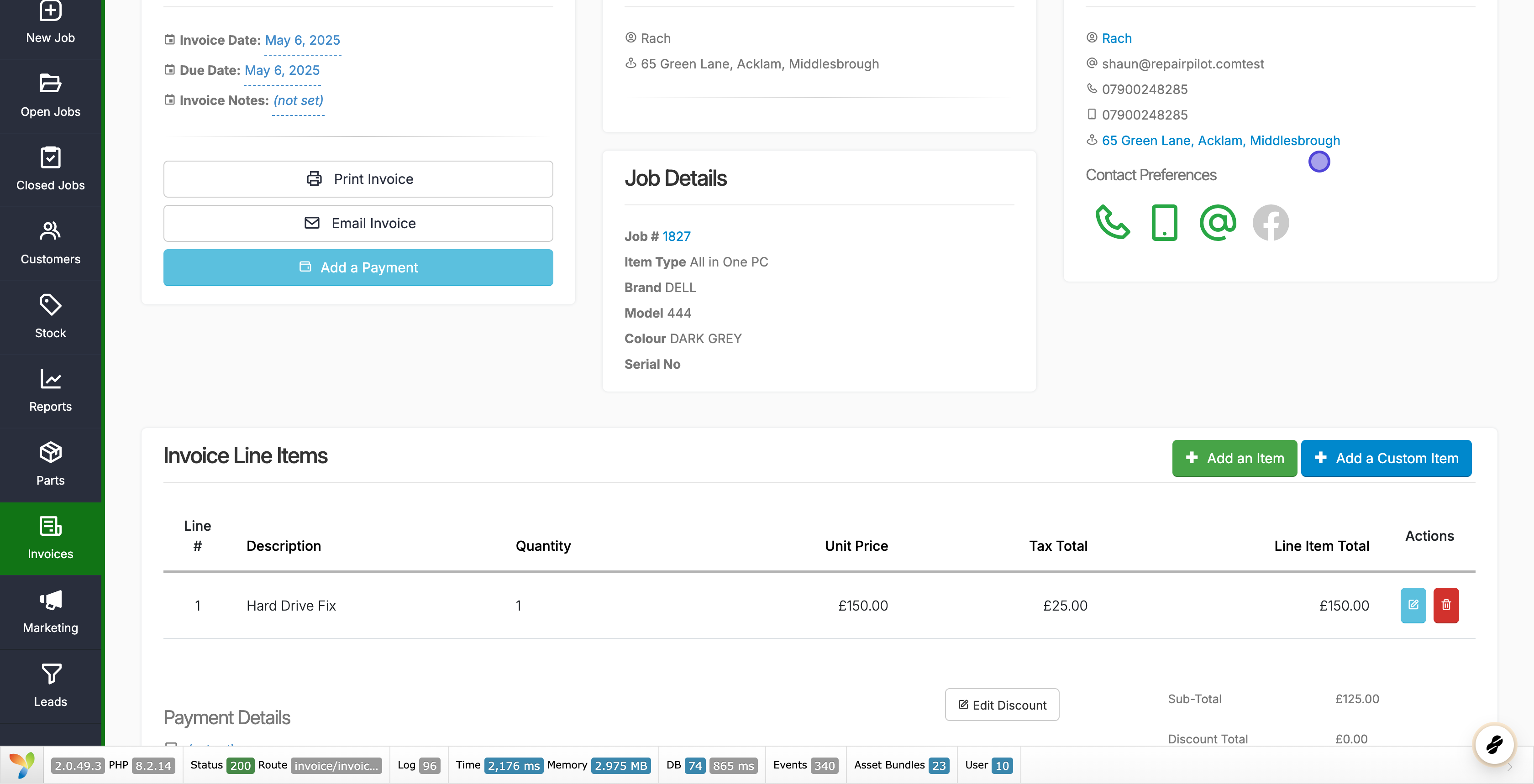
1. Go to Invoice 151 | bSoftware – Repair Pilot
#

2. Click on Add an Item
#

3. Click on Search parts, stock or repair types…
#

4. Type in highlight
#

5. Click on dght64hy – test
#

What are your Feelings

Share This Article :

  • Facebook
  • X
  • LinkedIn
  • Pinterest
Still stuck? How can we help?

How can we help?

Updated on July 22, 2025
Creating and Using Canned RepliesCreating and Using Canned Replies
Table of Contents
  • Guide with Localhost
    • 1. Go to Invoice 151 | bSoftware - Repair Pilot
    • 2. Click on Add an Item
    • 3. Click on Search parts, stock or repair types...
    • 4. Type in highlight
    • 5. Click on dght64hy - test

Repair Pilot Ltd
Company No. 12024325

UK
0800 13 37 491
0330 2233 736

Outside of the UK
+44 330 223 3736

Free Trial
Book a Demo

Product

  • Why Repair Pilot?
  • Business Types
  • All Features
  • Job Management
  • Customer CRM
  • Leads
  • Invoicing & Payments
  • Worksheets
  • Automation
  • Stock Management
  • Trade/Buy In Items
  • Customer Portal
  • Multiple Stores/Locations
  • Reporting
  • Customisation
  • Integrations

Resources

  • Platform Status
  • Support
  • Help Centre
  • Blog
  • Migrations
  • Case Studies
  • FAQ
  • Development Roadmap
  • Change log

Company

  • Contact Us
  • About
  • Privacy Policy
  • Cookie Policy
  • Website T&C's
  • User Agreement
  • Data Processing Agreement
  • Acceptable Use Policy

Repair Pilot Ltd © 2025, All rights reserved.

English
  • English
  • العربية
  • 中文
Repair Pilot
Manage Consent
To provide the best experiences, we use technologies like cookies to store and/or access device information. Consenting to these technologies will allow us to process data such as browsing behavior or unique IDs on this site. Not consenting or withdrawing consent, may adversely affect certain features and functions.
Functional Always active
The technical storage or access is strictly necessary for the legitimate purpose of enabling the use of a specific service explicitly requested by the subscriber or user, or for the sole purpose of carrying out the transmission of a communication over an electronic communications network.
Preferences
The technical storage or access is necessary for the legitimate purpose of storing preferences that are not requested by the subscriber or user.
Statistics
The technical storage or access that is used exclusively for statistical purposes. The technical storage or access that is used exclusively for anonymous statistical purposes. Without a subpoena, voluntary compliance on the part of your Internet Service Provider, or additional records from a third party, information stored or retrieved for this purpose alone cannot usually be used to identify you.
Marketing
The technical storage or access is required to create user profiles to send advertising, or to track the user on a website or across several websites for similar marketing purposes.
  • Manage options
  • Manage services
  • Manage {vendor_count} vendors
  • Read more about these purposes
View preferences
  • {title}
  • {title}
  • {title}
Please wait, this may take upto 20 seconds.
Please don't refresh the page, you will be redirected shortly. Thank you.
Starting...